
The best compact bike navigation computers make route guidance, ride tracking, and sensor data easier to manage without adding bulky equipment to your handlebars.
This roundup compares 10 GPS cycling computers across screen size, mapping, rerouting, battery practicality, connectivity, and weather resistance so you can choose with confidence.
Best 10 Compact Bike Navigation Computers Picks for 2026
Best Touchscreen Navigation

- 3.3-inch touchscreen plus buttons
- Dual-band, five-satellite positioning
- Voice guidance and automatic rerouting
Best For: Touchscreen-focused navigation and guided rides
Best Easy-Use Navigator

- 3-inch glove- and rain-friendly touchscreen
- Preloaded road, trail, and indoor profiles
- Traffic-aware maps and eBike routing
Best For: Simple navigation for touring and eBike rides
Best Complete Navigation Bundle
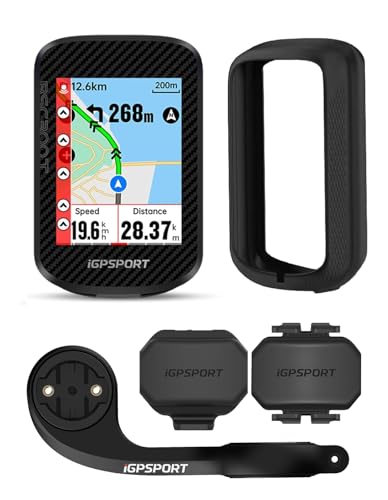
- Includes speed and cadence sensors
- Worldwide offline maps and rerouting alerts
- Up to 20-hour battery life
Best For: Offline navigation with a bundled sensor setup
Best Training-Focused Compact Computer

- Button-controlled 2.6-inch design
- Multi-band GNSS and ClimbPro
- Up to 26 hours of demanding-use battery
Best For: Structured training and long performance rides
Best Navigation Features

- Route imports from Strava, Komoot, and Ride with GPS
- 2.4-inch sunlight-readable color display
- 25-hour battery and IPX7 water resistance
Best For: Riders wanting compact route guidance with extensive ride metrics
Best Battery Life

- More than 50 hours of stated working time
- Automatic backlit 2-inch FSTN display
- Wireless design with IPX6 water resistance
Best For: Riders who want basic GPS data and maximum runtime
Best Touchscreen Mapping

- 2.8-inch touchscreen with offline color maps
- Re-route planning and multi-system satellite support
- Wi-Fi syncing and smart-trainer compatibility
Best For: Explorers and training-focused riders wanting advanced navigation
Lightweight Color Navigator

- 74g body with a 2.4-inch color display
- Turn guidance, rerouting, and five-second positioning
- ANT+/Bluetooth support for nine device types
Best For: Lightweight navigation and connected training
Long-Range Touchscreen Choice
COOSPO CS600 GPS Bike Computer

- 2.4-inch touchscreen with automatic backlight
- 36-hour battery and IPX7 waterproof protection
- Route navigation with GPS/GLONASS tracking
Best For: Long rides and wet-weather cycling
Route-Focused Training Computer
GEOID CC600 Color GPS Bike Computer

- Color navigation with GPX routes and automatic rerouting
- Five-second positioning across five satellite systems
- 108 data items and indoor smart-trainer support
Best For: Custom data layouts and route-heavy training
Best Touchscreen Navigation – iGPSPORT BSC500
For riders seeking compact bike navigation computers with a larger, easy-to-read display, the iGPSPORT BSC500 combines a 3.3-inch touchscreen with button controls. Dual-band, five-satellite positioning, voice guidance, automatic rerouting, and route imports from apps such as Strava and Komoot make it suited to navigation-focused rides.
Best For: Riders who want touchscreen convenience, voice prompts, and automatic off-course rerouting.
Pros:
- 3.3-inch touchscreen supports up to 12 cycling data fields per page.
- Dual-band positioning supports GPS, BeiDou, GLONASS, Galileo, and QZSS.
- Provides voice navigation, speed-based turn warnings, and automatic route replanning.
- IPX7 protection and a 2-year warranty add practical ownership benefits.
Cons:
- At 107 g, it is heavier than the listed Garmin Edge 540.
- Touchscreen operation may not appeal to riders who prefer buttons only.
The BSC500 is a strong choice when clear mapping and hands-free guidance matter more than minimizing weight. Its climbing and training features also give it broader utility beyond basic route following.
Best Easy-Use Navigator – Garmin Edge Explore 2
The Garmin Edge Explore 2 is one of the more approachable compact bike navigation computers, with a rain- and glove-friendly 3-inch touchscreen and preloaded activity profiles. Its maps highlight roads, trails, traffic, points of interest, and eBike routing, making route discovery straightforward.
Best For: Casual, touring, and eBike riders who prioritize simple touchscreen navigation.
Pros:
- 3-inch high-resolution touchscreen is designed for gloves, rain, and sunlight.
- Preloaded road, off-road, and indoor profiles simplify setup.
- Offers searchable points of interest, traffic awareness, and eBike routing.
- Provides a claimed battery life of up to 16 hours.
Cons:
- Heart-rate, speed, cadence, and awareness sensors are sold separately.
- Its 16-hour battery rating is shorter than the listed iGPSPORT BSC300T and Garmin Edge 540.
Choose the Edge Explore 2 if you want navigation without a steep setup process. It is less training-oriented than the Edge 540, but its simple profiles and ride-type maps are practical for varied recreational use.
Best Complete Navigation Bundle – iGPSPORT BSC300T
The iGPSPORT BSC300T is a practical pick among compact bike navigation computers when a ready-to-ride sensor bundle matters. It includes cadence and speed sensors, supports worldwide offline maps, and adds route previews, turn prompts, off-course warnings, and over 130 riding data options.
Best For: Riders who want offline navigation plus included speed and cadence sensors.
Pros:
- Includes CAD70 cadence and SPD70 speed sensors, mount, case, and cable.
- 2.4-inch touchscreen works with six buttons.
- Supports worldwide offline maps, saved routes, turn prompts, and off-course warnings.
- Offers up to 20 hours of battery life and ANT+/Bluetooth 5.0 connectivity.
Cons:
- The 2.4-inch display is smaller than the BSC500 and Garmin Edge Explore 2 screens.
- Its navigation features require downloading maps and routes for offline use.
The BSC300T delivers especially good practical value for riders building a sensor-equipped setup. Its smaller screen keeps the unit compact, while offline mapping and group tracking extend its usefulness on longer or unfamiliar rides.
Best Training-Focused Compact Computer – Garmin Edge 540
The Garmin Edge 540 is a compact, button-controlled option for riders who want navigation alongside advanced training tools. Multi-band GNSS, ride-type maps, ClimbPro, adaptive workout guidance, and a claimed battery life of up to 26 hours make it a strong fit for structured cycling.
Best For: Performance-minded riders who prefer physical controls and detailed training analysis.
Pros:
- Compact 2.6-inch computer uses button controls for operation.
- Multi-band GNSS improves positioning accuracy in challenging environments.
- ClimbPro, suggested workouts, adaptive coaching, power guidance, and stamina insights support training.
- Battery life reaches up to 26 hours in demanding use or 42 hours in battery-saver mode.
Cons:
- Several advanced training features require compatible power and heart-rate sensors.
- It lacks the touchscreen operation offered by the other listed models.
The Edge 540 is the best match when training depth and battery endurance outweigh touchscreen convenience. Its physical controls and advanced metrics make it particularly appealing for riders following structured plans or preparing for events.
Best Navigation Features – iGPSPORT BSC200S
For riders comparing compact bike navigation computers, the iGPSPORT BSC200S combines route guidance with a readable 2.4-inch color display and wireless sensor connectivity. It supports routes from the iGPSPORT app, Strava, Ride with GPS, and Komoot, while its semi-reflective screen is designed for visibility in sunlight.
Best For: Riders who want turn guidance, route importing, and broad ride-data tracking in a compact, weather-resistant computer.
Pros:
- Supports route creation, third-party route imports, one-touch navigation, and Back to Start guidance.
- Offers turn and yaw reminders plus incoming-call, SMS, and selected app notifications.
- Provides up to 25 hours of battery life, IPX7 water resistance, and more than 100 ride metrics.
- Works with ANT+ and Bluetooth sensors, plus compatible iGPSPORT light and radar products.
Cons:
- Type-C charging cable is not included.
- Navigation and notifications require use of the companion app and compatible connections.
The BSC200S is a strong all-around option when navigation matters as much as ride statistics. Its compact 67-gram design, long battery life, and IPX7 rating make it suitable for extended rides, while the customizable data pages add flexibility.
Best Battery Life – CYCPLUS G1
The CYCPLUS G1 is a simple, compact choice among compact bike navigation computers, focusing on GPS ride tracking and long runtime rather than detailed map navigation. Its 2-inch FSTN display uses automatic backlighting, and the wireless design keeps the handlebar setup uncluttered.
Best For: Cyclists who prioritize extended battery life, basic GPS ride data, and an easy-to-read display.
Pros:
- Offers more than 50 hours of stated battery life from its 1200mAh battery.
- Displays GPS-based ride information including time, distance, altitude, and current ride metrics.
- Automatic backlighting and FSTN technology support readability during day or night riding.
- Wireless, IPX6-rated construction and automatic sleep mode simplify daily use.
Cons:
- The supplied features focus on GPS statistics rather than turn-by-turn or map-based navigation.
- Its 2-inch display is smaller than the screens on the other listed computers.
The G1 is best viewed as a straightforward GPS computer with exceptional endurance. It suits riders who want core ride information without a more involved navigation system, and its two-year warranty adds practical ownership support.
Best Touchscreen Mapping – GEOID CC700 Pro
For cyclists seeking advanced compact bike navigation computers, the GEOID CC700 Pro adds a 2.8-inch color touchscreen, offline maps, and automatic re-route planning. Wi-Fi syncing, multi-constellation satellite support, and compatibility with ANT+ and Bluetooth accessories make it a feature-rich option for exploration and training.
Best For: Riders who want detailed offline maps, touchscreen controls, re-routing, and connected training features.
Pros:
- Provides offline global map downloads with 4GB of storage, turn prompts, street names, zoom, and dual-perspective views.
- Can recalculate a route after going off course when connected to the designated app.
- Supports GPS, BeiDou, GLONASS, QZSS, and Galileo, with AGNSS-assisted five-second positioning.
- Wi-Fi enables automatic ride-record syncing and firmware updates, while indoor smart-trainer training is supported.
Cons:
- At 0.22 kg, it is heavier than the other computers in this roundup.
- Re-route planning depends on maintaining a connection to the designated app.
- Its one-year warranty is shorter than the two-year warranties listed for the other two products.
The CC700 Pro is the most navigation-focused and feature-dense choice here. Its larger touchscreen and offline mapping are useful for unfamiliar routes, while Wi-Fi and smart-trainer support broaden its appeal beyond outdoor navigation.
Lightweight Color Navigator – Magene C506SE
The Magene C506SE is a compact bike navigation computer for riders who want a lightweight, color-screen unit with turn guidance and broad sensor compatibility. Its 2.4-inch display, five-second positioning, Wi-Fi syncing, and 24-hour battery suit everyday rides and structured training.
Best For: Riders who prioritize low weight, colorful navigation, and ANT+/Bluetooth device support.
Pros:
- Lightweight 74g design with a 2.4-inch color screen and simple three-button controls.
- Color route guidance includes turn prompts, off-course alerts, and route replanning through the OnelapFit app.
- Supports up to nine device types, including sensors, power meters, smart trainers, radar lights, and electronic shifting systems.
- Wi-Fi and Bluetooth connectivity support fast transfers, AGNSS syncing, and automatic data uploads.
Cons:
- Some navigation features require connection to the OnelapFit app through Bluetooth and Wi-Fi.
- The 24-hour battery life is shorter than some larger endurance-focused computers.
The C506SE stands out among compact bike navigation computers for its low weight and flexible training ecosystem. It is a practical pick when you want navigation and detailed ride data without a bulky head unit.
Long-Range Touchscreen Choice – COOSPO CS600 GPS Bike Computer
The COOSPO CS600 is a compact bike navigation computer for riders who prefer touchscreen control, automatic backlighting, and extended battery life. It combines route navigation, GPS/GLONASS tracking, IPX7 waterproofing, and a 36-hour runtime in a 2.4-inch color unit.
Best For: Touring and all-weather riders who want long battery life and touchscreen operation.
Pros:
- Responsive 2.4-inch color touchscreen with automatic backlight adjustment.
- Offers built-in route navigation, breadcrumb guidance, and route uploads.
- 36-hour battery supports longer rides and multi-day outings.
- IPX7 waterproof protection and connectivity with lights, radar, e-bikes, shifters, and indoor trainers.
Cons:
- Additional sensors and extension mounts are sold separately.
- At 120g, it is heavier than the Magene C506SE.
The CS600 is a strong choice if endurance and weather protection matter more than minimum weight. Its touchscreen and customizable data dashboard also make it convenient for riders who want direct control over navigation and metrics.
Route-Focused Training Computer – GEOID CC600 Color GPS Bike Computer
The GEOID CC600 is a compact bike navigation computer built around colorful route guidance, quick positioning, and customizable training data. It provides turn reminders, off-route rerouting, Wi-Fi transfers, and support for multiple satellite systems while keeping controls simple with three buttons.
Best For: Riders who want detailed route prompts, extensive data-page customization, and indoor smart-trainer support.
Pros:
- 2.4-inch color display with durable Asahi glass and turn notifications with automatic zoom.
- Supports GPX uploads and automatic rerouting when you leave the planned route.
- Five-second positioning with GPS, BeiDou, GLONASS, QZSS, and Galileo support when AGNSS is synced.
- Offers up to 10 pages, 108 data items, and compatibility with nine device types through Bluetooth and ANT+.
Cons:
- Five-second positioning depends on current AGNSS synchronization and suitable surroundings.
- Navigation route files and data exports rely on the companion app and account connections for services such as Strava and TrainingPeaks.
The CC600 is especially appealing for riders who want a highly configurable display and dependable route recovery. Its 24-hour battery and indoor training features make it versatile for both outdoor navigation and performance-focused sessions.
How We Picked These Compact Bike Navigation Computers
We focused on the features that matter most during real rides: dependable GPS positioning, readable displays, route navigation, rerouting or off-course alerts, wireless sensor support, water resistance, and practical physical size. The selection includes touchscreen and button-controlled models, color and monochrome-style displays, and options ranging from simple navigation computers to more advanced training-focused units.
We also considered compatibility with Bluetooth and ANT+ accessories, Wi-Fi or app syncing, battery capacity where listed, and whether each computer suits road riding, touring, commuting, ebikes, or structured training. Product claims and specifications can vary by configuration, so confirm current details before purchasing.
Quick Comparison
| Priority | Look for | Best fit |
|---|---|---|
| Simple navigation | Clear maps, route guidance, and easy controls | Casual riders, commuters, and touring cyclists |
| Training data | ANT+/Bluetooth support and broad sensor compatibility | Performance-focused riders |
| Touchscreen convenience | Color display with responsive map interaction | Riders who prefer smartphone-like controls |
| Low weight | Small display and lightweight housing | Minimalist road and fitness setups |
| All-weather use | IPX6 or IPX7 water resistance | Riders exposed to rain and wet roads |
Key Buying Factors for Compact Bike Navigation Computers
Navigation and Mapping
Check whether the device provides turn-by-turn directions, downloadable offline maps, off-course warnings, and automatic rerouting. Basic route guidance may be enough for familiar roads, while touring and exploratory riding benefit from map detail and reroute planning.
Display and Controls
Larger color screens are generally easier to read and better for maps, but they can add weight and consume more power. Touchscreens offer intuitive panning and menu access, while physical buttons are often easier to operate with gloves or in wet conditions. Consider glare visibility and backlight performance as well as diagonal screen size.
Connectivity and Sensors
Bluetooth and ANT+ support allow pairing with heart-rate monitors, cadence sensors, speed sensors, power meters, and ebike systems. Wi-Fi or automatic app syncing can reduce setup time after a ride. If you already own sensors, verify protocol compatibility before buying.
Durability and Battery Practicality
For frequent outdoor use, water resistance is important, but also check mounting security, operating temperature, charging connection, and advertised battery life. GPS, navigation, backlighting, and connected sensors can reduce runtime compared with basic recording.
Who Should Buy Which Compact Bike Navigation Computers?
Choose a straightforward, smaller unit if you mainly want speed, distance, route following, and occasional navigation without a complicated training ecosystem. A touchscreen color model is a better choice for riders who frequently follow unfamiliar routes and want maps that are easier to interpret at a glance.
Training-oriented cyclists should prioritize sensor compatibility, structured workout features, data fields, and reliable synchronization over the largest screen. Touring riders should look for offline mapping, rerouting, strong weather resistance, and battery capacity. Ebike users should confirm whether the computer supports the relevant ebike data connection. Finally, commuters and budget-conscious riders should compare mounting options, map functionality, and app reliability rather than paying solely for advanced performance metrics.
