
The best bike navigation computers make it easier to follow routes, monitor rides, and stay oriented without constantly checking your phone. The right model can also add useful features such as rerouting, wireless sensor support, touchscreen controls, and turn-by-turn guidance.
We compared 10 GPS cycling computers across navigation, display design, connectivity, durability, and everyday usability to help you choose the right fit for commuting, touring, training, or e-bike adventures.
Best 10 Bike Navigation Computers Picks for 2026
Best Touchscreen Navigation

- 3.3-inch touchscreen with button control
- Dual-band, five-satellite positioning
- Voice alerts and automatic rerouting
Best For: Large-screen route guidance and audible navigation
Best Easy-Use Navigator

- 3-inch glove- and rain-friendly touchscreen
- Road, trail, POI, traffic, and eBike routing
- LiveTrack and incident detection support
Best For: Recreational and eBike navigation
Best Offline Mapping Value
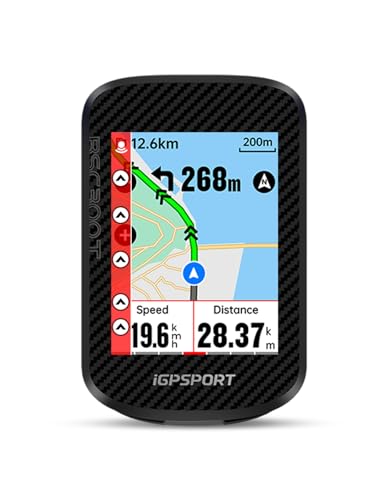
- Worldwide offline map downloads
- 130-plus ride metrics and dual protocols
- Up to 20 hours of battery life
Best For: Offline routes and data-rich multisport riding
Best for Training Insights

- Multi-band GNSS and ride-specific maps
- Up to 26 hours, or 42 in battery saver
- Adaptive coaching and ClimbPro tools
Best For: Structured training and long-distance performance riding
Best Route-Sharing Value

- App and third-party route imports
- 25-hour battery with IPX7 water resistance
- 100+ ride metrics and ANT+/Bluetooth support
Best For: Everyday riders seeking long battery life and simple route navigation
Best Smart Training Features

- Global maps and turn-by-turn navigation
- Wi-Fi, Bluetooth, and ANT+ connectivity
- Indoor training and nine device-type support
Best For: Data-focused cyclists combining outdoor navigation with indoor training
Best Large-Screen Navigation

- 3.5-inch touchscreen map display
- Automatic off-course route replanning
- 35-hour battery and dual-band GPS
Best For: Touring and climbing riders who prioritize visible maps and long endurance
Best Large-Screen Navigator

- 2.8-inch color touchscreen with offline maps
- Re-routing, turn prompts, and street names
- ANT+/Bluetooth/Wi-Fi and indoor training support
Best For: Riders prioritizing a large display and advanced navigation
Best Lightweight Training Option

- Lightweight 74-gram design with a 2.4-inch color screen
- Route guidance, off-course alerts, and re-planning
- Supports nine device types and up to 24 hours of battery
Best For: Training-focused riders who want a lightweight navigation computer
Best Customizable Value

- Color route navigation with GPX support and rerouting
- 108 data items with 29 layout options
- Wi-Fi, Bluetooth, ANT+, and indoor training support
Best For: Riders wanting flexible data screens and button-based navigation
Best Touchscreen Navigation – iGPSPORT BSC500
For riders who want clear guidance without giving up detailed ride data, the iGPSPORT BSC500 is a capable choice among bike navigation computers. Its 3.3-inch touchscreen supports both touch and button controls, while dual-band, five-satellite positioning is designed to improve accuracy and reduce interference.
Best For: Riders who prioritize large-screen navigation, voice prompts, and automatic rerouting.
Pros:
- 3.3-inch touchscreen displays up to 12 cycling data fields per page.
- Supports routes from the iGPSPORT app, Strava, Komoot, and imported route files.
- Provides voice navigation, speed-based turn warnings, and automatic yaw replanning.
- Includes climb planning, training analysis, and a continue-last-ride function.
Cons:
- Its 107-gram weight is higher than the smaller BSC300T.
- Voice navigation and some route features depend on supported app or route connections.
The BSC500 stands out for riders who want navigation to be the centerpiece of the device. The combination of a large display, audible prompts, rerouting, and route-planning tools makes it especially practical for unfamiliar roads and longer rides.
Best Easy-Use Navigator – Garmin Edge Explore 2
The Garmin Edge Explore 2 is a straightforward option for cyclists who want bike navigation computers with minimal setup. Its 3-inch, glove- and rain-friendly touchscreen provides ride-specific maps, searchable points of interest, traffic awareness, and routing support for road, off-road, indoor, and eBike use.
Best For: Recreational cyclists and eBike riders who want simple touchscreen navigation and connected safety features.
Pros:
- 3-inch high-resolution touchscreen is designed for glove use, rain, and direct sunlight.
- Preloaded activity profiles and ride-type-specific maps simplify setup.
- Offers searchable POIs, traffic visibility, and eBike routing with battery-related guidance.
- Supports LiveTrack, GroupTrack, incident detection, and Varia devices when compatible.
Cons:
- Battery life is listed at up to 16 hours, shorter than several alternatives here.
- Heart-rate, speed, cadence, and Varia accessories are sold separately.
- Its listed map coverage is North America.
The Edge Explore 2 favors accessibility over highly specialized training tools. It is a sensible pick for riders who want dependable map-based guidance, useful location features, and eBike-aware routing in an easy-to-use package.
Best Offline Mapping Value – iGPSPORT BSC300T
The iGPSPORT BSC300T packs broad route functionality into a compact bike navigation computer. It combines a 2.4-inch touchscreen with six buttons, worldwide offline map downloads, route previews, turn prompts, and off-course warnings, making it useful for road, mountain, and eBike rides.
Best For: Riders who want offline maps, extensive ride metrics, and long battery life in a compact unit.
Pros:
- Supports worldwide offline map downloads and multiple saved routes.
- Provides route previews, turn prompts, and persistent off-course warnings.
- Tracks more than 130 ride metrics and supports ANT+ and Bluetooth sensors.
- Offers up to 20 hours of battery life plus real-time group tracking.
Cons:
- The 2.4-inch screen is smaller than the BSC500 and Garmin Explore 2 displays.
- A USB-C cable is not included according to the supplied details.
- Touch and button operation may require more familiarity than a simpler touchscreen-only device.
The BSC300T is a strong fit when offline access and data variety matter more than display size. Its combination of global mapping, off-course alerts, sensor compatibility, and 20-hour battery rating gives it flexibility for varied riding.
Best for Training Insights – Garmin Edge 540
The Garmin Edge 540 is aimed at cyclists who want bike navigation computers to support structured training as well as route finding. Its button-controlled interface pairs advanced navigation and multi-band GNSS with ClimbPro, adaptive workout guidance, power targets, stamina insights, and ride-specific maps.
Best For: Performance-focused cyclists who want long battery life, button controls, and advanced training guidance.
Pros:
- Multi-band GNSS is designed to improve positioning accuracy in challenging environments.
- Battery life is rated up to 26 hours in demanding use or 42 hours in battery-saver mode.
- ClimbPro shows ascent and grade, even when riding without a course.
- Offers adaptive workouts, power guidance, stamina insights, and cycling ability analysis with compatible sensors.
Cons:
- Button controls may be less intuitive for riders who prefer touchscreens.
- Several advanced training features require compatible power and heart-rate sensors.
- The listed map coverage is North America.
The Edge 540 is the most training-oriented option in this group. It makes the most sense for cyclists who will use compatible sensors and want navigation features backed by climbing tools, coaching prompts, and extended battery performance.
Best Route-Sharing Value – iGPSPORT BSC200S
The iGPSPORT BSC200S is a practical choice among bike navigation computers for riders who want route planning, clear sunlight readability, and broad ride-data tracking without a bulky unit. Routes can be created in the iGPSPORT app or imported from services including Strava, Ride with GPS, and Komoot.
Best For: Road and touring cyclists who want straightforward wireless navigation, long battery life, and compatibility with ANT+ and Bluetooth sensors.
Pros:
- Supports app-created and third-party routes, plus one-touch, back-to-start, and ride-record navigation.
- 2.4-inch color display uses a semi-reflective design for improved sunlight visibility.
- Up to 25 hours of battery life, IPX7 water resistance, and more than 100 riding data options.
- Can connect with compatible iGPSPORT front and radar lights.
Cons:
- Navigation setup and page customization depend on the iGPSPORT app.
- The listed package does not include a Type-C cable.
The BSC200S balances useful navigation features and endurance with a relatively light 67-gram design. It is especially appealing if you already use the iGPSPORT ecosystem or want extensive ride metrics alongside basic route guidance.
Best Smart Training Features – Magene C506
The Magene C506 stands out among bike navigation computers for combining turn-by-turn maps with fast connectivity and indoor training tools. Its 2.4-inch touchscreen can download global maps, display custom routes, and connect with a wide range of ANT+ and Bluetooth cycling devices.
Best For: Riders who want navigation, structured indoor training, smart-light control, and detailed performance data in one computer.
Pros:
- Supports free global map downloads, turn-by-turn navigation, custom routes, and GPX uploads.
- Wi-Fi and Bluetooth connectivity support faster data uploads and AGNSS-assisted positioning.
- Connects with up to nine device types, including power meters, smart trainers, radar lights, and electronic shifting systems.
- Offers indoor training functions, customizable data layouts, and up to 24 hours of endurance-mode battery life.
Cons:
- Its broad training and device-support features may require time in the OnelapFit app.
- The supplied specifications do not confirm a current software-update date.
The C506 is a versatile option for cyclists who want more than navigation. Its touchscreen, Wi-Fi, smart-trainer support, and extensive sensor compatibility make it a strong fit for riders managing both outdoor routes and structured indoor sessions.
Best Large-Screen Navigation – iGPSPORT BiNavi
The iGPSPORT BiNavi is a large-screen option among bike navigation computers, with a 3.5-inch color touchscreen designed for map-focused riding. It supports routes from the iGPSPORT app and third-party services, while dual-band GPS and five satellite systems aim to improve positioning accuracy and resistance to interference.
Best For: Touring, climbing, and navigation-focused riders who prefer a large touchscreen, long battery life, and automatic off-course rerouting.
Pros:
- 3.5-inch touchscreen provides a larger map interface than the other listed models.
- Supports route imports, saved-point navigation, automatic route replanning, and climb previews.
- Dual-band GPS supports GPS, BeiDou, GLONASS, Galileo, and QZSS positioning systems.
- Offers up to 35 hours of battery life plus music control and training-analysis features.
Cons:
- At 103 grams, it is heavier than the BSC200S and Magene C506.
- The supplied details do not list an IP water-resistance rating.
BiNavi is the most navigation-centric choice in this group, particularly for riders who value map visibility and route recovery when they go off course. Its long battery rating and climbing tools also suit extended rides with substantial elevation.
Best Large-Screen Navigator – GEOID CC700 Pro
For riders who want a highly visible display, the GEOID CC700 Pro is a feature-rich option among bike navigation computers. Its 2.8-inch color touchscreen combines offline map support, turn prompts, route recalculation, and multiple connectivity options for touring, training, and everyday navigation.
Best For: Cyclists who prioritize a large touchscreen, offline maps, and built-in rerouting.
Pros:
- Large 2.8-inch color touchscreen with touchscreen and button controls.
- Supports offline map downloads, turn prompts, street names, zoom, and dual-perspective views.
- Recalculates routes when you go off course while connected to the designated app.
- Supports ANT+, Bluetooth, Wi-Fi, indoor smart-trainer workouts, and IPX7 water resistance.
Cons:
- Rerouting depends on maintaining a connection to the designated app.
- The larger touchscreen may be more device than riders seeking a minimal display need.
The CC700 Pro stands out when navigation visibility and route flexibility matter most. Its extensive feature set is especially useful for riders who also want indoor training and broad device connectivity.
Best Lightweight Training Option – Magene C506SE
The Magene C506SE balances route guidance with training-focused data in a compact 74-gram design. Among bike navigation computers, it is a practical choice for riders who want a color screen, fast positioning, wireless syncing, and broad sensor compatibility without adding much weight.
Best For: Weight-conscious cyclists who want navigation plus detailed indoor and outdoor training data.
Pros:
- Lightweight 2.4-inch color-screen computer with simple three-button operation.
- Provides turn guidance, off-course alerts, route re-planning, and GPX route uploads through OnelapFit.
- Supports ANT+ and Bluetooth connections for up to nine device types, including power meters and smart trainers.
- Offers up to 24 hours of battery life, Wi-Fi syncing, and customizable data layouts.
Cons:
- Navigation features require connection to the OnelapFit app.
- Button controls may be less direct than a touchscreen for some riders.
The C506SE is a well-rounded pick for cyclists who view navigation as part of a broader training setup. Its light weight, extensive data customization, and sensor support make it particularly versatile for structured riding.
Best Customizable Value – GEOID CC600
The GEOID CC600 is a practical middle-ground choice among bike navigation computers, pairing colorful route guidance with extensive data customization. It supports GPX uploads, automatic rerouting, fast positioning, and up to 24 hours of battery life, while its button-based interface keeps operation straightforward.
Best For: Riders who want customizable training screens and reliable route guidance without a touchscreen.
Pros:
- 2.4-inch color display with durable Asahi glass and three-button controls.
- Supports GPX routes, turn reminders, zooming, turn notifications, and automatic rerouting.
- Offers up to 10 pages, 108 supported data items, and 29 display layouts.
- Includes Wi-Fi and Bluetooth syncing, ANT+ compatibility, indoor training, and up to 24 hours of battery life.
Cons:
- Route uploads and rerouting rely on the companion phone app.
- Its 2.4-inch screen is smaller than the CC700 Pro’s display.
The CC600 makes sense for riders who want navigation and a highly configurable training dashboard in one device. It offers a broad feature set while retaining a simple button-operated design.
How We Picked These Bike Navigation Computers
We focused on the features that matter most when navigating by bike: GPS accuracy, map and route support, rerouting or off-course alerts, screen readability, battery practicality, and ease of setup. We also considered wireless connectivity, including Bluetooth and ANT+ support for pairing heart-rate monitors, cadence sensors, power meters, lights, and other accessories.
Models with touchscreen controls, color mapping, Wi-Fi syncing, voice guidance, or indoor-training compatibility received attention where those features add meaningful value. Water resistance and durable construction were also important because cycling computers need to handle changing weather and regular outdoor use.
Quick Comparison
| Best For | Look For |
|---|---|
| Simple route following | Clear mapping, turn prompts, and easy controls |
| Training and performance | ANT+/Bluetooth sensors, detailed ride data, and structured workout support |
| Touring and exploration | Long battery life, offline maps, rerouting, and a readable display |
| E-bike riding | Navigation, ride metrics, and broad accessory compatibility |
| Value-focused cycling | Reliable GPS, route import, and essential wireless features |
Key Buying Factors for Bike Navigation Computers
Navigation and Mapping
Check whether the computer supports turn-by-turn directions, color maps, offline navigation, route recalculation, or off-course warnings. Basic breadcrumb routing can be sufficient for familiar trails, while touring and unfamiliar-road riding benefit from map detail and automatic rerouting.
Display and Controls
A larger color screen is easier to read when following maps, but it may add weight and use more battery. Touchscreens are convenient for panning and changing settings, while physical buttons can be more dependable in rain, cold weather, or when wearing gloves.
Connectivity and Sensors
Bluetooth and ANT+ support allow a computer to connect with common cycling sensors. If you train seriously, confirm compatibility with your power meter, heart-rate monitor, cadence sensor, radar, or smart trainer before buying.
Battery, Weather Resistance, and Setup
Consider expected ride length and whether maps, navigation, and wireless connections will be used continuously. A waterproof rating such as IPX7 is useful for all-weather riding. Wi-Fi syncing and app integration can make route transfers, firmware updates, and ride uploads much easier.
Who Should Buy Which Bike Navigation Computers?
Choose a straightforward GPS computer if you want dependable route guidance without a steep learning curve. Riders who regularly explore unfamiliar roads should prioritize a larger color display, offline maps, and rerouting. Training-focused cyclists should select a model with strong ANT+/Bluetooth support and detailed performance metrics. E-bike users should verify compatibility with their preferred sensors and look for a display that remains easy to read in varied light.
For touring, prioritize navigation reliability, battery endurance, weather protection, and route management over decorative extras. For commuting and recreational rides, a compact model with fast GPS positioning and simple wireless syncing may provide all the functionality you need. The best Bike Navigation Computers are not necessarily the most feature-packed; they are the ones whose navigation, controls, and connectivity match how and where you ride.
